
The R36S Review question is simpler than the hype makes it look: this handheld is a cheap, capable retro machine if your target is mainly PS1 and below, but it stops being impressive the second you expect miracle performance from N64, Dreamcast, or PSP. I bought into the same promise most people do, a dirt-cheap retro handheld that might somehow overdeliver, and the truth is more interesting than the sales pitch.
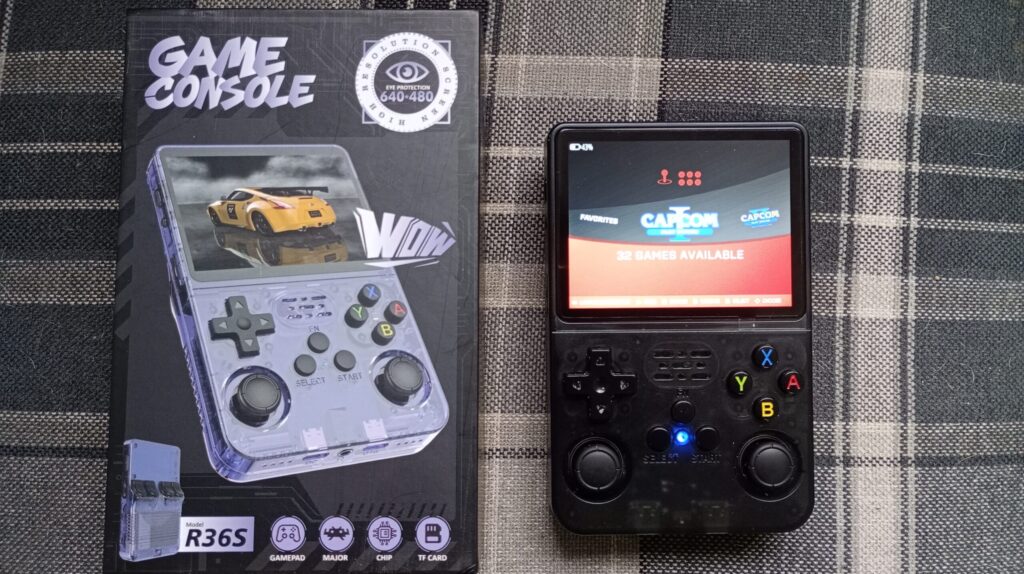
The R36S gives you a genuinely good screen, usable controls, dual microSD flexibility, and solid Linux-based software, but it also asks you to tolerate weak stock storage, noisy shoulder buttons, and uneven higher-end emulation.
The first ownership snag is that the R36S often feels better in a ten-minute unboxing than it does after three evenings of real use. On paper, dual microSD slots and ArkOS sound straightforward, but I found the actual ownership curve starts with card swaps, ROM cleanup, firmware checking, and a bit of patience before the fun properly starts. That does not ruin the value, but it absolutely changes the type of buyer who will think this handheld is brilliant rather than annoying.
KEY TAKEAWAYS
- The R36S is excellent for 8-bit, 16-bit, and most PS1 gaming, which is where its budget value becomes obvious.
- The stock microSD card is the weakest part of the package, and replacing it should be treated as day-one maintenance, not an optional upgrade.
- N64 and Dreamcast support exists, but it is inconsistent enough that you should treat those systems as bonus territory rather than the main reason to buy the device.
- The screen is better than the price suggests, while the analog sticks, loud triggers, and cramped shape are the main hardware compromises.
- ArkOS and EmulationStation do a lot of the heavy lifting, because the software experience improves sharply once you stop relying on the stock card and default setup.
R36S Pros and Cons
| Pros | Cons |
|---|---|
| Stunning IPS Screen: High-quality 640×480 display that punches way above the price point. | Poor Stock MicroSD: The included card is prone to failure and must be replaced immediately. |
| Great PS1 Performance: Handles almost the entire PlayStation 1 library with ease. | Noisy Buttons: The shoulder buttons are very loud and “clicky,” which can be annoying in quiet rooms. |
| Dual SD Slots: Allows you to separate your operating system from your game library for easier management. | Inconsistent High-End Emulation: N64, Dreamcast, and PSP performance is hit-or-miss and often unstable. |
| ArkOS Support: Access to a powerful, community-backed Linux operating system with deep customization. | Ergonomic Fatigue: The narrow vertical body and low stick placement can cause hand cramps during long sessions. |
| Unbeatable Value: Offers a genuine retro gaming experience for a fraction of the cost of big-brand rivals. | Cheap Analog Sticks: The sticks feel more like directional buttons than precision inputs. |
R36S Review Verdict
The R36S is best viewed as a value-first retro handheld, not a tiny all-in-one miracle box. Its RK3326 chip and ARM Cortex-A35 CPU are old by handheld standards, yet they still have enough headroom for NES, SNES, Mega Drive, Game Boy, arcade titles, and most PS1 games to feel smooth and satisfying on a 3.5-inch 640×480 IPS panel. That matters more than spec-sheet bragging, because this class of device lives or dies on whether the games people actually want to replay feel stable, legible, and responsive.
The value argument also depends on expectations. If you want a cheap companion device for bus rides, lunch breaks, travel, or casual evening sessions, the R36S makes a strong case because it delivers most of the nostalgia with far less financial risk than a pricier handheld. If you want consistent N64, Dreamcast, or PSP performance, this is where the budget magic runs out and physics starts talking back.
R36S vs R36 Ultra vs R36 Max
If you are browsing today, you’ll likely see the R36 Ultra and R36 Max listed alongside the original S model. While they share the same RK3326 processor, there are key differences:
- R36S: The classic 3.5-inch vertical handheld. Most portable and cheapest.
- R36 Max: Features a larger 4.0-inch screen and a beefier 4000mAh battery. Better for long sessions but slightly bulkier.
- R36 Ultra: The newest “premium” revision (often called the V2). It adds joystick LED lighting and refined spring-loaded triggers, fixing the “clicky” noise issue mentioned later in this review.
| Feature | R36S | R36 Ultra | R36 Max |
|---|---|---|---|
| Screen Size | 3.5″ (640×480) | 4.0″ (720×720) | 4.0″ (720×720) |
| Battery | 3200 mAh | 3500 mAh | 4000 mAh |
| Game Count | ~15,000 | ~20,000+ | ~20,000+ |
Performance, what it actually plays
The R36S performs best when you keep it in its natural lane, which is 2D retro gaming and the easier half of the 32-bit era. On 8-bit and 16-bit systems, performance is effectively a non-issue, with stable emulation, quick loading, and useful extras like save states and fast-forward. Arcade support is also respectable for many 2D titles, which means the device feels far more complete than a bargain-bin toy once you start using it the way it was meant to be used.
PS1 emulation
PS1 emulation is the strongest reason to buy the R36S if you want more than basic 16-bit nostalgia. Games such as Final Fantasy VII, Spyro, Crash Team Racing, and Resident Evil 2 are the sort of library where this hardware finally feels properly matched to the workload. The screen resolution also suits PS1-era visuals nicely, so games look sharp instead of awkwardly stretched or muddied on a tiny panel.
PS1 performance matters because it changes the buyer profile. A lot of budget handhelds can claim old Nintendo and Sega support, but not all of them make the jump to comfortable PlayStation gaming without feeling compromised. The R36S largely clears that bar, which is why it remains relevant even with newer budget options around.
N64, Dreamcast, and PSP limits
N64 performance is the part most listings oversell. Some games, especially lighter titles like Mario 64 and Mario Kart 64, can run well enough to be enjoyable, but a large portion of the library falls into the category of playable-on-paper rather than genuinely fun. If your dream is reliable R36S N64 performance across the whole library, you are shopping in the wrong tier.
Dreamcast emulation follows the same pattern. The device can surprise you with a few workable titles, and that is impressive for the price, but texture issues, slowdown, and uneven frame pacing stop it from being a dependable Dreamcast machine. PSP is even more conditional, which is another way of saying you should treat success stories as exceptions, not guarantees.
The hidden problem with higher-end emulation is not just raw framerate, it is how unstable the experience can feel once a game gets busy. I had a few titles that looked acceptable in menus or during the first minute, then fell apart when audio streaming, transparency effects, or larger environments kicked in. On the R36S, swapping emulator cores, disabling visual extras, and sticking to lighter games can improve results, but none of that turns the device into a trustworthy N64 or Dreamcast specialist.
PortMaster adds a useful twist to the performance story. Native Linux ports like Undertale, Doom-derived projects, and other lightweight releases can give the system a second life once you get bored of ROM management, and that makes the software ecosystem more interesting than the hardware alone would suggest.
Build quality, controls, screen, and speaker
Build quality is better than the price suggests, but not better than the compromises. The shell is plain plastic rather than anything luxurious, yet it generally feels serviceable instead of flimsy, and the front buttons plus D-pad are good enough to support the systems this device was built for. That is the main theme of the R36S hardware, acceptable almost everywhere, occasionally impressive, rarely refined.

The controls are a mixed bag in a very specific way. Face buttons tend to feel responsive, the D-pad is usable for classic systems, and input lag is low enough that the machine does not feel cheap in motion. The analog sticks are much less convincing, because they behave more like blunt directional tools than nuanced sticks, which is bad news for racers and 3D games that need softer movement.
The shoulder buttons and start-select area are the parts that feel most obviously budget. They are loud, clicky, and a little more irritating than they should be during longer sessions or quiet-room play. I can live with that on a throw-in-a-bag handheld, but it still feels like a reminder that the bill of materials had to break somewhere.
The less obvious issue is cumulative comfort. I noticed the narrow body and lower stick placement became more annoying after twenty or thirty minutes than they did in a quick first test, especially in games that use shoulder buttons heavily or ask for repeated diagonal inputs. That kind of hand fatigue never shows up in product listings, but it is often the reason a budget handheld ends up admired more than actually used.
The display is one of the nicest surprises here. A 3.5-inch IPS screen at 640×480 is exactly the sort of spec that sounds ordinary until you actually use it with retro content, where the 4:3 layout, color punch, and brightness make older games look lively and appropriately scaled. This is one area where the R36S genuinely punches above its class, and it does a lot to make the whole device feel more premium than the price tag suggests.
The R36S speaker is fine, not magical. Built-in audio is usable for menu navigation, short gaming sessions, and casual handheld play, but it is not rich enough to become a selling point by itself. Headphones or lower expectations are still the right answer if audio quality matters to you.
ArkOS, EmulationStation, and the stock microSD problem
Software is where the R36S becomes either a bargain or a headache. Out of the box, many units ship with ArkOS and EmulationStation, which is a strong foundation, but the included microSD card is notorious for being the weakest part of the entire package. That single issue explains a large share of the frustration around this handheld.
The stock microSD card should be replaced immediately with a reliable brand-name card. This is not enthusiast paranoia, because low-grade bundled cards are widely associated with corruption, disappearing settings, failed boots, and lost saves. If you budget for the handheld without budgeting for a proper card, you are not calculating the real price.
ArkOS is worth the effort because it gives the hardware a cleaner, more stable identity. Once installed correctly, it makes menu navigation easier, supports updates, improves overall organization, and opens the door to better ROM and BIOS management, themes, and add-ons like PortMaster. The catch is that setup can get messy if you run into the device’s screen-panel lottery.
The frustrating part is that many R36S problems look like software bugs when they are really storage, image, or shutdown problems. I have had budget handhelds in this class appear dead after a bad flash, an incomplete shutdown, or a fussy cable, and the R36S adds extra confusion because panel variation can make the wrong boot files look like total hardware failure. Once you understand that, the device feels much less mysterious, and your troubleshooting becomes faster and a lot less emotional.
R36S setup checklist for a stable first week
| Problem | Likely cause | What to do |
|---|---|---|
| Device boots once, then hangs on logo | Weak stock microSD card or corrupted image | Reflash ArkOS on a quality branded card, then test with a clean boot before copying ROMs |
| Black screen after flashing | Wrong boot files or panel mismatch | Use the correct image package for your screen type, then test again before changing themes or settings |
| Games missing from menu | Wrong folder structure or unsupported file placement | Check ROM folders, rescan game lists, and confirm BIOS files are in the expected directories |
| Save files vanish or settings reset | Unstable card, bad shutdown, or unsafe removal | Shut down from the menu every time, reseat the card, and move saves to a reliable card |
| N64 or Dreamcast feels worse than expected | Wrong emulator core or unrealistic performance target | Test lighter titles first, change cores where available, and lower expectations for demanding games |
| Charging feels inconsistent | Cable or charger mismatch | Use a simple, reliable charger and cable, then let the battery settle before judging battery behavior |
DTB files are a niche detail that suddenly becomes very important on the R36S. Because multiple screen panel variants exist, the wrong DTB file can leave you staring at a black screen even though the handheld is technically booting. That sounds obscure, but it is one of the most practical reasons an R36S setup guide matters more than it does on better-polished devices.
Dual microSD slots are a nice quality-of-life feature when you actually understand how to use them. You can separate the operating system from the ROM library, or you can keep everything on one card if you prefer simplicity and your chosen setup behaves well. This flexibility is part of why the device appeals to hobbyists even when the hardware itself is modest.
If you want a broader setup path after this review, see my broader retro handheld guide that compares the R36S with its closest budget rivals and explains where it really fits.
Value, alternatives, and who should buy it
Value is the real battlefield for the R36S. This handheld is not trying to beat better devices in raw power, materials, or polish, because it wins by getting close enough on the experiences people actually revisit most often while costing much less. That is why so many buyers still take it seriously despite its age and limitations.
Compared with pricier budget rivals, the R36S usually loses on refinement but stays dangerously competitive on fun-per-pound. If another handheld costs more and mainly gives you slightly better plastics, slightly better ergonomics, and slightly less software tinkering, the R36S remains hard to dismiss for casual players. If the higher-priced alternative gives you meaningfully better 3D emulation, cleaner controls, and less setup friction, then spending extra starts to make sense.
The ideal buyer is easy to picture. This is a great fit for someone who wants a first retro handheld, a travel device, a backup console, or a low-risk way to replay old favorites without babying expensive hardware. It also suits tinkerers who enjoy flashing firmware, organizing ROM collections, and squeezing more life out of humble chips like the RK3326.
The wrong buyer is just as easy to identify. If you care most about flawless Dreamcast, broad PSP support, dependable R36S N64 compatibility, or premium handheld ergonomics, you should skip this and buy into a higher tier. The R36S is cheap, not limitless, and it gets much better the moment you stop asking it to be something it never promised to be.
Conclusion
My R36S Review verdict is straightforward: this handheld is absolutely worth considering if your idea of retro gaming means 8-bit through PS1, and only occasionally testing the edge of what N64 or Dreamcast can do on low-cost hardware. The build quality is decent, the screen is legitimately good, ArkOS gives it a proper hobbyist backbone, and the real hidden cost is replacing the weak stock microSD card before it wastes your time. Buy it for value, buy it for tinkering, buy it as a guilt-free travel companion, but do not buy it expecting premium controls or miracle emulation.
Common R36S Questions & Facts
- Who makes the R36S? Unlike brands like Anbernic or Retroid, the R36S is an “open-source” hardware design manufactured by various factories in China (often associated with GameLab or generic “R-Series” labels). This is why you see so many different sellers on AliExpress and Amazon.
- Does it come with games? Yes, most units ship with a microSD card pre-loaded with anywhere from 15,000 to 20,000 games.
- Do you have to pay for games? No. The games (ROMs) are included for free, and you can add your own by putting them on the SD card. You never have to pay a subscription.
- Is it good for Pokémon? Yes. It is arguably the best budget Pokémon machine. It runs every game from Gen 1 (Red/Blue) through Gen 3 (Emerald/FireRed) perfectly. It also handles Nintendo DS Pokémon titles like Platinum or HeartGold reasonably well using the built-in DraStic emulator.
- Can you connect the R36S to a TV? No. The R36S does not have an HDMI-out port. If playing on a TV is a dealbreaker, you should look at the Anbernic RG35XX Plus instead.
- R36S Alternatives: If the R36S feels too “DIY,” the Miyoo Mini Plus is a more polished beginner alternative, while the Anbernic RG35XX H offers a horizontal layout and built-in Wi-Fi.
